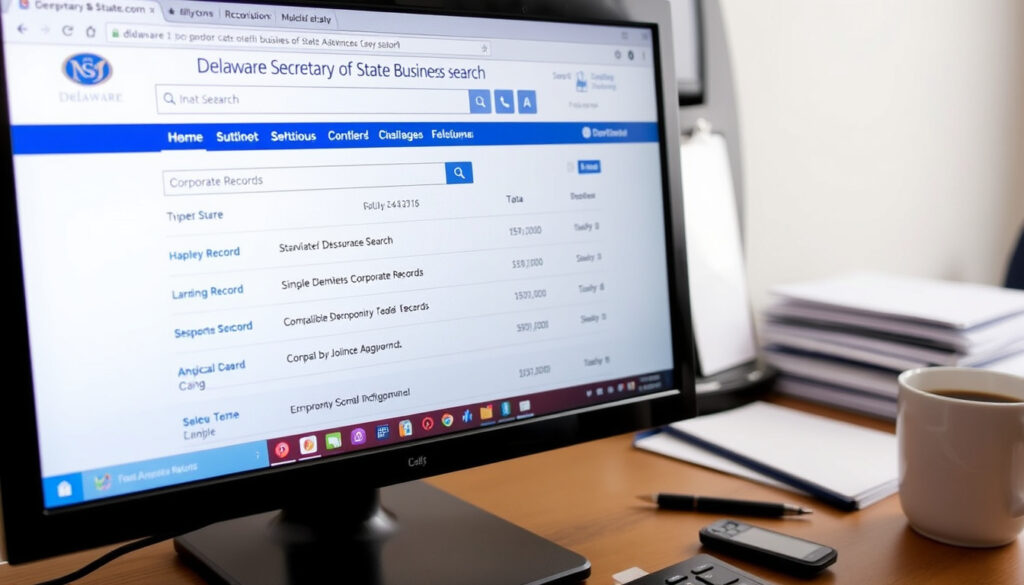
Delaware Secretary of State Business Search: How to Look Up
Anyone who has tried to look up a Delaware business knows the official search tool gives you the basics — but not always the full picture. This guide walks you through the Delaware Secretary of State business search step by step, covering what you can find for free, what stays hidden, and how to verify a company’s legitimacy with confidence.
Official search tool URL: icis.corp.delaware.gov/ecorp/entitysearch/namesearch.aspx ·
Entity status returned: Active and inactive ·
Check entity name availability: Available on corp.delaware.gov ·
Fee for basic search: Free
Quick snapshot
- Free search returns entity name, file number, formation date, registered agent details (Delaware Division of Corporations (state government))
- Both active and inactive entities appear in results (Delaware Division of Corporations (official search portal))
- Paid status reports cost $10 or $20 (Online Status – Division of Corporations (state service))
- LLC member names are not publicly disclosed in Delaware filings
- Database update frequency is not published
- Some voluntary details may appear on annual reports
- Search results are real-time as of the date of query (Delaware Division of Corporations (official portal))
- Filing history for the last five filings available in $20 status report (Delaware Division of Corporations (official portal))
- To check Good Standing, use the $10 or $20 paid status service (Online Status – Division of Corporations (state service))
- Certificate of Good Standing requires a separate request (Online Status – Division of Corporations (state service))
Five key facts about the Delaware business entity search tool, one pattern: the basics are free and public, but deeper details come at a cost.
| Fact | Value |
|---|---|
| Official search URL | icis.corp.delaware.gov/ecorp/entitysearch/namesearch.aspx |
| Number of entities | Over 1 million registered (widely reported) |
| Search fields | Entity name, file number |
| Free of charge | Yes |
| Returns inactive entities | Yes |
How to look up a business in Delaware?
Accessing the official Delaware Division of Corporations search tool
Visit the official search page at icis.corp.delaware.gov (Delaware Division of Corporations, the state’s business registry). No account or login is needed — the search is free and public. You may be asked to complete a CAPTCHA before viewing results, according to secretaryofstate.com (independent business search guide).
Entering the entity name correctly
Enter the business name in the “Entity Name” field. The tool allows partial name searches — you don’t need the exact legal name. For precision, you can also search by file number using a separate field. The search returns a table of matching entities.
Interpreting search results
Each result row shows the entity name, file number, formation date, registered agent name and address, plus entity kind, type, and residency. The free display does not include current status (Active/Inactive) — you need a paid status report for that. The results table can display a maximum of fifty rows, as noted by secretaryofstate.com (independent guide).
How do I find out who owns a Delaware LLC?
What ownership information is publicly available?
Delaware LLCs are not required to disclose member (owner) names in their public filings. The official search returns the registered agent, who is often a service company, not the beneficial owner. Harvard Business Services (LLC formation specialist) confirms that member details are typically confidential in Delaware.
Accessing the LLC’s public records
You can view the certificate of formation and any filed annual reports. In some cases, annual reports may voluntarily include member names, but this is not mandated. The Division of Corporations no longer provides filing history over the phone or via live chat (Delaware Division of Corporations (state notice)).
Limitations: member names vs. registered agent
The registered agent’s name and address are always public. If the agent is a commercial registered agent (e.g., a law firm), the actual owner remains anonymous. For corporations, director and officer names are listed in public filings — a key difference from LLCs (LendingTree (small business resource)).
Delaware’s privacy protections make LLC ownership opaque. For investors or partners, the only way to confirm a member is through the company itself, not the public database.
How do I check a Delaware corporation’s status?
Using the entity status check tool
Delaware offers a paid online status service: $10 for a basic status report (no official certificate) and $20 for status plus tax and history information, which includes the last five filings, franchise tax assessment, total authorized shares (if applicable), and tax due (Online Status – Division of Corporations (official state service)). Both options are non-refundable.
Understanding status codes (Good Standing, Void, etc.)
“Good Standing” means the corporation has paid all required fees and franchise taxes. A “Void” status indicates the entity has been dissolved for failure to pay franchise tax. The $20 report includes the complete status history.
Checking franchise tax compliance
The $20 status option includes the franchise tax assessment and shows any amount due. You can also pay franchise taxes directly through DelawareFranchiseTax.com (independent payment portal) – but always verify on the official Division of Corporations (state homepage) first.
The $10 report does not generate an official certificate of good standing. If you need certified proof, you must request a certificate separately for an additional fee.
How to check if a business is legit in Delaware?
Verifying active status and good standing
A legitimate business will show “Active” status on the paid status report. Confirm that the entity filed its annual report and paid franchise taxes. Use the Division of Corporations (state government) to access the Check Entity Status tool.
Cross-checking with the Division of Corporations database
Match the registered agent name and address from the free search against the entity’s known contact details. Discrepancies may indicate a shell or inactive company. The free search results are real-time and reflect the database as of the date of the search (Delaware Division of Corporations (official portal)).
Red flags: inactive or void entities
Entities with “Void” status have been administratively dissolved for non-payment. An “Inactive” entity may still be in good standing but not currently operating. Always request the $20 status report before entering a significant transaction.
How to find out who is a business owner?
Differences between LLCs and corporations
Corporations are required to list officers and directors in their filings — those names appear in the public record. LLCs, however, treat member information as private. This asymmetry is a key reason many startups incorporate in Delaware as LLCs while maintaining anonymity (Gryffin Capitalist (business formation analysis)).
Searching by registered agent vs. director/officer
For corporations, you can find director names through the certified copy of the certificate of incorporation or annual reports. For LLCs, the registered agent is the only contact point publicly linked to the entity.
Using third-party databases for deeper research
If you need to identify beneficial owners, services like Commenda (business compliance platform) aggregate data across multiple states, but even they rely on voluntarily filed information.
Delaware’s strong privacy protections mean that unless the LLC voluntarily discloses members, the public record will not tell you who actually controls the company. For thorough due diligence, you may need to request information directly from the entity.
Confirmed facts
- Delaware Division of Corporations provides a free public business entity search (Delaware Division of Corporations (state government))
- Search returns both active and inactive entities (Delaware Division of Corporations (official portal))
- Corporation officer names are public; LLC member names are typically not disclosed
What’s unclear
- Exact ownership details for LLCs may appear on annual reports if voluntarily provided
- The frequency of database updates is not publicly stated
“To retrieve information on a Delaware entity, key in the name of the entity you are searching.”
— Delaware Division of Corporations, official search instructions (state government)
“The search table can display a maximum of fifty rows.”
For anyone researching a Delaware company — whether you’re an investor, a creditor, or a potential partner — the choice is clear: rely on the free search for basic identification and registered agent details, then invest $20 for the official status report that can reveal tax compliance, filing history, and good standing. Without that paid report, you are flying blind on the one thing that matters most: whether the entity is legally legitimate.
Related reading
For those interested in how other states handle similar tasks, the Illinois Secretary of State services guide offers a useful comparison.
Frequently asked questions
Is the Delaware business entity search free?
Yes, the basic name or file number search is free and public. Additional status reports cost $10 or $20.
Do I need to create an account to search?
No account is required. You can search immediately on the Division of Corporations search page.
Can I search by the business’s file or registration number?
Yes, the search tool includes a field for file number, allowing direct lookup.
What does ‘Good Standing’ mean for a Delaware corporation?
It means the corporation has paid all required franchise taxes and filed annual reports. You can verify status via the paid online service.
How can I get a certified copy of a Delaware business record?
Certified copies must be requested from the Division of Corporations for a fee. The online status reports are not certified.
Are there any limits on how many searches I can do?
No daily search limit has been stated, but the results table caps at fifty rows per query.
What if the business I search for does not appear in the database?
The entity may not be registered in Delaware, may be inactive under a different name, or may not exist. Try alternate name spellings or check the Name Availability tool.
More related posts
 Quesadilla Steak Near Me: Best Cuts & Local Spots Guide
 Journey Together Booster Box – Contents, Prices and Pull Rates
 Air Conditioning Repair Services: Costs & When to Replace
 Best Bank for Checking Account in Ireland: Top Picks
 Mikki Mase Net Worth 2026: $32M Claim vs Reality
 Low Taper Textured Fringe: Complete Guide & Fade Options
 Squid Game Season 3: Release, Cast, Winner & Plot Explained
 Amon-Ra St. Brown – Stats, Bio, Family and Contract