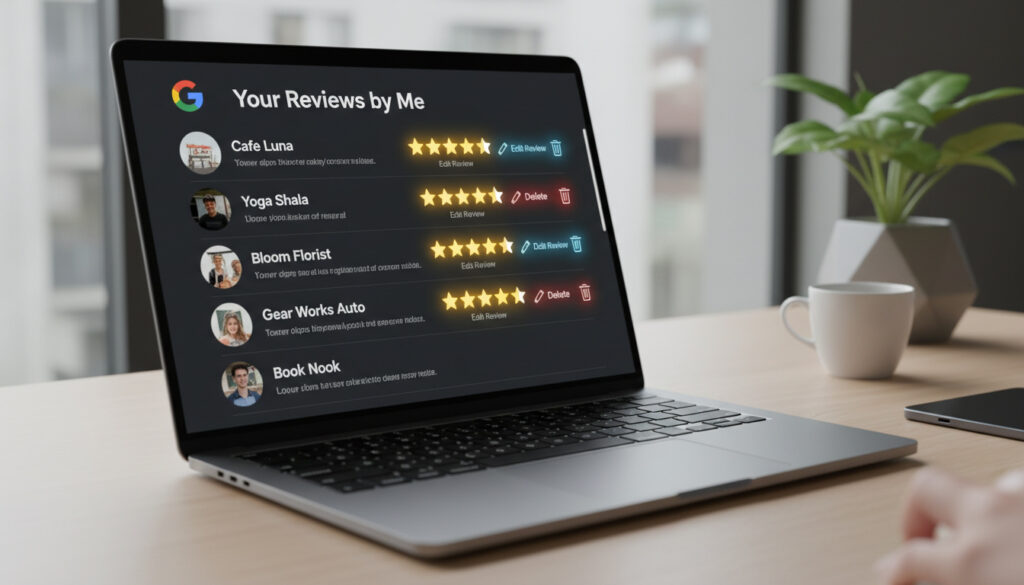
Google Reviews by Me – Find, Edit and Delete Guide
Google Maps and Search accumulate every restaurant rating, hotel review, and photo you contribute under a unified system called “reviews by me.” Locating this scattered history becomes essential when you want to update a recommendation, remove outdated feedback, or simply audit your digital footprint across the platform.
Accessing these contributions requires navigating through Google Maps on mobile or desktop, though the exact menu paths differ between Android and iOS applications. Your Google Account serves as the central hub for this data, syncing contributions across phones, tablets, and browsers when properly authenticated. You can locate, edit, and delete personal reviews through official pathways, though synchronization failures and data recovery limitations apply under current policies.
How do I find reviews I’ve written on Google?
Essential Facts About Review Access
- Reviews sync across Maps, Search, and Business interfaces automatically
- Old reviews may require account recovery if accidentally deleted
- Deletion becomes permanent after the 30-day recovery window closes
- Mobile and desktop interfaces maintain slightly different navigation paths
- Contributions include photos, ratings, and text reviews in a single feed
- Business owners access different dashboards than consumer reviewers
- Cross-device sync requires consistent Google Account authentication
| Action | Steps | Device | Time |
|---|---|---|---|
| Find reviews | Maps > Profile > Contributions | All | 1 min |
| Delete review | Tap review > Delete | Mobile | 30 sec |
| Edit review | Tap review > Edit > Save | Mobile | 1 min |
| View on desktop | Maps > Menu > Your contributions | Desktop | 1 min |
| Export data | Google Takeout > Maps | Desktop | 5 min |
| Report issue | Help Center > Contact | All | Varies |
How do I delete or edit a Google review I wrote?
To edit a review on mobile, tap your profile picture in Google Maps, open “Your contributions,” then select the “Reviews” tab. Each entry displays a three-dot menu containing edit and delete options. Desktop users access this through the hamburger menu in Maps, then “Your contributions,” though the interface presents reviews in a list format rather than the card-based mobile layout.
Business owners manage reviews differently through business.google.com, where they can respond to customer feedback but cannot edit the original text of reviews left by others. Personal contributions, however, remain fully editable by the original author until deletion.
Editing Reviews on Mobile and Desktop
Android and iOS applications allow star rating adjustments, text modifications, and photo additions or removals. The edited review retains the original timestamp but displays an “Edited” label to other users. Changes propagate across all Google services within minutes, though cached versions in third-party applications may persist longer.
Permanent Deletion Protocols
Deletion causes immediate removal from public view, followed by a 30-day recovery period accessible through Google Account trash. After this window expires, the data enters Google’s standard deletion pipelines with no guaranteed recovery path. Users seeking to manage their local business reputation should note that personal and business review management require separate workflows.
Once the 30-day recovery period expires, deleted reviews cannot be restored through standard support channels. Google Account recovery tools offer the only potential retrieval method for accidentally removed contributions, with success varying based on backup sync status.
Why can’t I find my old Google reviews and how to fix it?
Synchronization failures account for most missing review complaints, particularly when users switch between Android and iOS devices or attempt to access legacy contributions created under different Gmail addresses. The Google Business Profile Help Center documents specific steps for resolving these discrepancies.
Cross-Device Sync Resolution
Verifying that all devices use the same Google Account resolves the majority of visibility issues. Users should check myaccount.google.com to confirm active sessions and review privacy settings that might restrict contribution visibility. Clearing the Google Maps application cache on Android or offloading the app on iOS frequently restores missing entries without data loss.
Timeline and Filter Limitations
Google introduced the Contributions tab in 2018, consolidating reviews from previous years. Reviews written before 2015 may not display in the current interface due to data migration policies. Users can check “Your Timeline” in Maps for location history associated with older reviews, though the text content may no longer be accessible.
Account Recovery for Deleted Content
Accidentally deleted reviews require immediate action through Google’s Account recovery flow. The Business FAQ documentation emphasizes that recovery becomes impossible after Google’s system purge cycles complete, typically within 30 days of deletion.
Before assuming reviews are lost, verify that the Contributions tab does not have active filters limiting the date range. Tap the filter icon in Maps > Contributions > Reviews to ensure “All time” remains selected rather than “Past year” or custom ranges.
How Has Google Review Management Changed Over Time?
-
Google launches the Contributions tab in Maps, centralizing review management previously scattered across Google+ and Local Guides interfaces.
-
Review management migrates to Google Account Data & Privacy settings, allowing users to download contribution history via Takeout and manage deletion preferences centrally.
-
Policy updates introduce auto-archiving for expired or dormant contributions, with updated recovery protocols documented in support materials.
What Is Established vs Uncertain About Review Access?
Verified Information
- Reviews remain accessible via Maps > Contributions and Google Account data exports
- Synchronization requires consistent Google Account authentication across devices
- Business owners manage customer reviews through separate Google Business Profile dashboards
- Deletion processes follow a 30-day recovery window before permanent removal
Remaining Uncertainties
- Exact retention periods for reviews written before 2015 remain unspecified
- Recovery success rates for deleted contributions vary based on backup timing
- Specific criteria triggering auto-archiving under 2024/2025 policies are not publicly detailed
- Timeline for third-party cache clearing after deletion remains variable
What Is Google Reviews by Me and Why Does It Matter?
Google reviews by me refers to the searchable archive of ratings, written feedback, and photographs contributed by individual users to Google Maps and Search results. This system powers local business visibility while creating a persistent record of personal commercial experiences.
Privacy implications extend beyond simple star ratings. Each contribution potentially reveals travel patterns, frequent establishments, and consumer preferences. Users managing local SEO impact should recognize that personal review history influences the recommendation algorithms suggesting new businesses in Google Maps.
For business owners, distinguishing between their personal review contributions and their company’s customer review dashboard proves essential. The former requires Google Maps access, while the latter demands authentication through business.google.com.
What Do Official Google Records Indicate?
Your contributions are private by default.
— Google Support Documentation
Technical support for review recovery and management flows through the Maps support ecosystem, though developers note that business review management falls outside API support channels. Workspace administrators specifically redirect profile-related inquiries to the Business Profile Help Center rather than corporate support tiers.
Key Takeaways for Managing Your Google Review History
Regular audits of your contribution history prevent outdated recommendations from influencing local search results while ensuring your digital footprint accurately reflects current opinions. For comprehensive Maps optimization strategies, maintaining accurate personal reviews supports the credibility of your Google Account across both consumer and business applications.
Frequently Asked Questions
Do Google reviews expire?
Google reviews do not automatically expire, though contributions from 2018 or earlier may be archived. Reviews remain visible indefinitely unless manually deleted or removed for policy violations.
How to leave a review on Google?
Search for the business in Google Maps or Search, tap the “Reviews” tab, select the star rating, write your feedback, and post. Photos can be added before submission.
Can I download all my Google reviews for backup?
Yes. Use Google Takeout at myaccount.google.com > Data & Privacy > Download your data. Select “Maps” and choose JSON or HTML format for your contributions.
Why do my reviews show on one device but not another?
This typically indicates different Google Accounts signed in on each device. Verify account consistency in Settings, or check if filters are active in the Contributions tab.
How long does Google keep deleted reviews?
Deleted reviews remain recoverable for approximately 30 days through Google Account trash. After this period, permanent deletion occurs with no guaranteed recovery method.
Can business owners see my personal information when I leave a review?
Business owners see your public Google Account name and photo associated with the review. Email addresses and private account details remain hidden unless you include them in the review text.
More related posts
 Farmers Market Near Me Dublin: Best Markets Today
 Posiciones de Selección de Fútbol de México – FIFA 13th, CONCACAF Leader
 Wine Store Near Me: Top Local & Online Ireland Options
 How to Lower Triglycerides: Fast Diet & Lifestyle Changes
 Loans for Bad Credit in Ireland: Best Options & Where to Apply
 Put It In Reverse Terry: Viral Meme Origin Story Explained
 Best Workout Routines for Beginners: Schedule, Safety & Tips
 Hayley Atwell Movies and TV Shows – Full List and Highlights