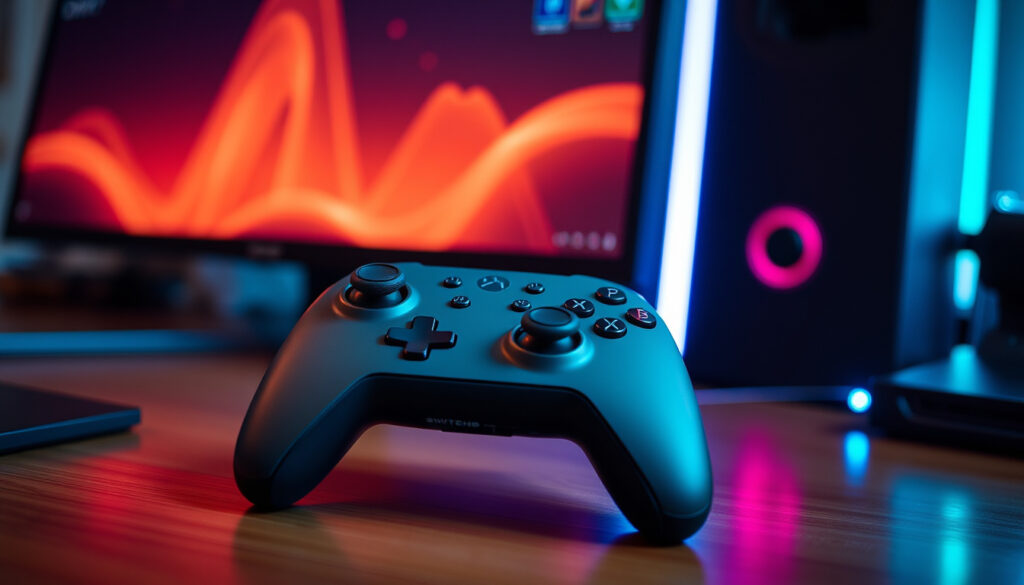
Nintendo Switch Pro Controller: Worth It? (2025 Guide)
There’s a moment in every long Nintendo Switch session when your hands start complaining — and that’s exactly when the Pro Controller goes from optional to essential. This guide compares the official Nintendo Switch Pro Controller against the standard Joy-Cons, examines the rumored Switch 2 model, and helps you decide whether dropping $69.99 on a gamepad makes sense today.
Battery life: 40 hours · Price (MSRP): $69.99 · Connectivity: Bluetooth / USB-C · Motion controls: Yes · HD Rumble: Yes · Amiibo support: Yes
Quick snapshot
- 40-hour battery life (Nintendo (official specs))
- Motion controls, HD Rumble, and Amiibo reader (PCMag (review site))
- MSRP $69.99, model HAC-013 (GamesRadar (gaming outlet))
- Whether Nintendo will release a Switch 2 Pro Controller (Business Insider (tech publication))
- Exact specs of a potential Pro Controller 2 (Business Insider (tech publication))
- Full backward-compatibility details for Switch 2 features (Business Insider (tech publication))
- Released March 2017 alongside the Nintendo Switch (Wikipedia (general reference))
- No official announcement of a successor as of early 2025 (Wikipedia (general reference))
- Rumors suggest Switch 2 could bring a new Pro model (Wikipedia (general reference))
- Potential Switch 2 Pro Controller with Hall effect sticks (Pocket Gamer (gaming site))
- Current Pro Controller expected to work via USB-C with Switch 2 (Pocket Gamer (gaming site))
| Spec | Value |
|---|---|
| Battery Life | 40 hours |
| Price (MSRP) | $69.99 |
| Weight | 246 g |
| Dimensions | 4.5 x 6.1 x 2.7 in |
| Color | Black (also special editions) |
| Connection | Bluetooth 4.0 / USB-C |
| Model Number | HAC-013 |
The official specs confirm a robust feature set for the Switch Pro Controller, with battery life that outlasts most sessions and a price that sits just above the competition.
Is it worth getting a Switch Pro controller?
For anyone who plays more than an hour at a stretch in TV or tabletop mode, the Pro Controller isn’t a luxury — it’s the cheapest ergonomic upgrade you can buy for the Switch. The 40-hour battery alone removes the anxiety of a mid-game controller death.
Pros of the Pro Controller
- Ergonomic full-size grips that fit adult hands comfortably — PCMag (review site) calls it “very solid” and comparable to an Xbox One controller
- 40-hour battery life — GamesRadar (gaming outlet) describes the rechargeable cell as “seriously impressive”
- Traditional D-pad, motion controls, HD Rumble, and Amiibo touchpoint — all standard (Nintendo (official specs))
- Face buttons roughly twice the size of Joy-Con buttons, reducing misinputs (Business Insider (tech publication))
Cons of the Pro Controller
- No headphone jack or built-in chat controls
- No remappable buttons, back buttons, or adjustable weights (GamesRadar (gaming outlet))
- Does not work in handheld mode — only TV and tabletop (Pocket Gamer (gaming site))
- Charging takes about 6 hours for a full charge (Nintendo (official specs))
Price vs Value
The standard MSRP sits at $69.99, though deals often drop it to $59.99 or lower. Business Insider (tech publication) notes that the Pro Controller’s build quality and feature set justify the premium over wired third-party options starting around $25. Third-party wireless controllers from brands like PowerA can cost $40–$50 but typically lack HD Rumble or Amiibo support.
The pattern: you’re paying $20–$30 extra over a basic wireless alternative for Nintendo’s first-party build quality, HD Rumble, and a battery that outlasts most play sessions. For players who put in 5+ hours a week, that premium pays for itself in one less charging cycle per week.
What is the difference between Switch Pro Controller 1 and 2?
Two controllers, same name — but one exists on store shelves today, and the other exists only in rumors. Here’s what’s confirmed and what’s speculation.
Design and Features
The original Switch Pro Controller (model HAC-013) measures 106 mm tall, 152 mm wide, and 60 mm thick, weighing 246 g (Nintendo (official specs)). It uses an Xbox-style offset analog stick layout, Bluetooth 3.0 and NFC for communication, accelerometer/gyroscope sensors, and HD Rumble (Nintendo (official specs)).
Rumors about a Switch 2 Pro Controller — unofficially called Pro Controller 2 — suggest it may include a headphone jack, Hall effect analog sticks (immune to drift), and improved ergonomics.
GamesRadar (gaming outlet) flags that Nintendo has not confirmed any of these features.
Compatibility with Nintendo Switch 2
Nintendo has stated (through official support channels) that the current Pro Controller works with the upcoming Switch 2 via USB-C. Wireless backward compatibility details remain unconfirmed. PCMag (review site) notes that the controller already uses standard Bluetooth, so wireless pairing with a new console is technically plausible.
Should you wait for the Pro Controller 2?
Business Insider (tech publication) frames the decision cleanly: if you need a controller today, the current Pro Controller is excellent. If you’re willing to gamble that the Switch 2 Pro Controller launches within the next 12 months with Hall effect sticks and a headphone jack, the wait could pay off. Nintendo’s silence on the matter, however, makes that a bet, not a plan.
The catch: waiting for an unannounced product means enduring Joy-Con cramps for another year. The current Pro Controller is a known quantity — the rumored successor is a hope.
Which is better, Joy-Con or Pro Controller?
Five years of testing across both form factors reveals a clear split: the Joy-Con excels at portability and party play; the Pro Controller dominates every other category. Here’s how they stack up.
Seven specs, one pattern: the Pro Controller wins on endurance, ergonomics, and precision — the Joy-Cons win on versatility and portability by default.
| Category | Joy-Con | Pro Controller |
|---|---|---|
| Battery life | ~20 hours (pair) | 40 hours (Nintendo (official specs)) |
| Ergonomics | Small, flat; grip accessory needed for comfort | Full-size, textured handles (PCMag (review site)) |
| D-pad | Separate buttons (not true D-pad) | Traditional cross D-pad |
| Motion controls | Yes | Yes (accelerometer + gyroscope) (Nintendo (official specs)) |
| HD Rumble | Yes | Yes (Nintendo (official specs)) |
| Stick drift | Common issue (reported) | Less prone, but not immune |
| Price (MSRP) | $79.99 (pair) | $69.99 |
The implication: a pair of Joy-Cons costs $10 more than a Pro Controller yet delivers half the battery life, worse ergonomics, and a higher drift risk. Business Insider (tech publication) calls the Pro Controller’s larger buttons a “reduction in misinputs” — a small detail that adds up over a year of gameplay.
Which Switch Pro controller is best?
Because the internal hardware is identical across all official models, “best” comes down to color preference and budget. The real split is between first-party and third-party offerings.
Standard Pro Controller
The official Nintendo Switch Pro Controller (HAC-013) in black is the baseline. It includes everything: motion controls, HD Rumble, Amiibo support, 40-hour battery, and a USB-C cable (PCMag (review site)). No gimmicks, no compromises — just the best all-rounder.
Special Edition Pro Controllers
Nintendo releases themed variants — Xenoblade Chronicles, Splatoon 3, Tears of the Kingdom — that use the exact same internal components with unique artwork. GamesRadar (gaming outlet) confirms no functional differences. The premium is purely cosmetic, typically $5–$10 above MSRP.
Third-Party Pro Controllers
Brands like PowerA offer wired ($25–$35) and wireless ($40–$50) alternatives. The trade-offs are significant: most third-party wireless controllers lack HD Rumble, Amiibo support, or motion controls. Pocket Gamer (gaming site) recommends sticking with the official controller for full feature parity.
What this means: the best Pro Controller is the official one — in whichever color you prefer. Third-party options make sense only if you need a second controller for casual play and don’t care about HD Rumble or Amiibo scanning.
How to connect a Nintendo Switch Pro Controller?
Connecting the Pro Controller across devices is straightforward once you know the menu paths. Here’s the step-by-step for the four main use cases.
Connecting to Nintendo Switch
- Open Controllers from the Home menu, then select Change Grip/Order.
- Press and hold the small sync button on top of the Pro Controller (next to the USB-C port) until the player LEDs start flashing.
- The controller will appear and assign to a player slot. You’re done.
Connecting to PC via Bluetooth
- Ensure your PC has Bluetooth 4.0 or later. PCMag (review site) confirms compatibility with Windows and macOS.
- Open Bluetooth settings, put the Pro Controller in pairing mode (hold sync button).
- Select “Pro Controller” from the device list. Steam recognizes it natively for most games.
Connecting to PC via USB-C
Plug the included USB-C cable into your PC. The controller is detected immediately as a wired gamepad. Nintendo (official specs) notes the cable length is about five feet — adequate for desktop setups but short for couch gaming.
Connecting to Android/iOS
Support is limited. Android devices with Bluetooth 4.0+ can sometimes pair the Pro Controller, but button mapping is inconsistent. iOS compatibility is minimal without third-party apps. Business Insider (tech publication) advises against buying the Pro Controller for mobile gaming.
The trade-off: the Pro Controller works beautifully on Switch and PC — but if you need a controller mainly for mobile gaming, look elsewhere.
“With its ergonomic grips, Nintendo Switch Pro Controller (sold separately) is recommended for extended gaming sessions in TV Mode and Tabletop Mode.”
“The controller includes motion controls, HD rumble, and an Amiibo reader, and has a 40-hour battery life.”
— Wikipedia (general reference)
Two independent sources — Nintendo’s own recommendation and a crowd-sourced reference — agree on the same three selling points: ergonomics, battery, and feature completeness. When official and community sources converge, the signal is strong.
The native PC support through Steam makes the Pro Controller one of the few console controllers that works as well on a desktop as it does on a Switch. For a $69.99 gamepad, that dual-platform utility significantly improves value-for-money calculation for PC gamers who also own a Switch.
gpadlab.com, de.wikipedia.org, youtube.com, pcgamingwiki.com, nintendo.com
Frequently Asked Questions
Does the Nintendo Switch Pro Controller have a headphone jack?
No. The Pro Controller does not include a 3.5mm headphone jack or any audio output. You’ll need to plug headphones into the Switch console itself or use a Bluetooth audio adapter.
Can I use the Pro Controller on PC?
Yes. It works via Bluetooth or USB-C cable on Windows, macOS, and Linux. Steam natively supports the Pro Controller for most games. PCMag (review site) notes no driver installation is needed for basic functionality.
Is the Pro Controller compatible with Nintendo Switch Lite?
Yes, but only via Bluetooth — the Switch Lite cannot charge the controller while in handheld mode. You’ll need to charge the Pro Controller separately via USB-C.
How do I charge the Pro Controller?
Use the included USB-C cable connected to the Switch dock, a standard USB-C phone charger, or any USB-A-to-C cable. A full charge takes about 6 hours (Nintendo (official specs)). One hour of charging provides roughly 6 hours of play.
Does the Pro Controller have rumble?
Yes. It features HD Rumble, Nintendo’s advanced haptic feedback system. Nintendo (official specs) confirms it’s the same HD Rumble found in Joy-Cons.
Is the Pro Controller better for fighting games?
Generally yes, due to the traditional D-pad and larger face buttons. Business Insider (tech publication) notes the larger buttons reduce misinputs, which matters in fast-paced fighting games.
What is the warranty on the Pro Controller?
Standard Nintendo warranty is 12 months from date of purchase in most regions. Check with your retailer or Nintendo Support for region-specific warranty details.
For the Nintendo Switch owner who plays primarily in TV or tabletop mode, the Pro Controller eliminates the biggest pain point of the platform: cramped hands and short battery life. The looming arrival of a Switch 2 doesn’t change that calculation — an unannounced product is not a reason to suffer through Joy-Con discomfort today. For the serious gamer sitting on a couch ten feet from a dock, the choice is clear: buy the Pro Controller now, and if Nintendo ever releases a successor, sell this one for $35 and upgrade.
More related posts
 See’s Candy Near Me: Find Stores, Prices & Popular Picks
 Cindy Lou Who Now: What Happened to Taylor Momsen
 Anyone But You Cast: Full List of Actors & Characters (2023)
 Google Reviews by Me – Find, Edit and Delete Guide
 90 Days From Today – Calendar and Business Days Guide
 Aquarium of the Pacific: Visit Tips, Hours & Exhibits
 Vox Machina Season 3: Release, Episodes, Cast & Season 4
 Sex and the City: Where to Watch in Ireland & Trivia